The screen is a mirror of the MIDImix: eight strips and a master, in the same places. What you touch is where you look.
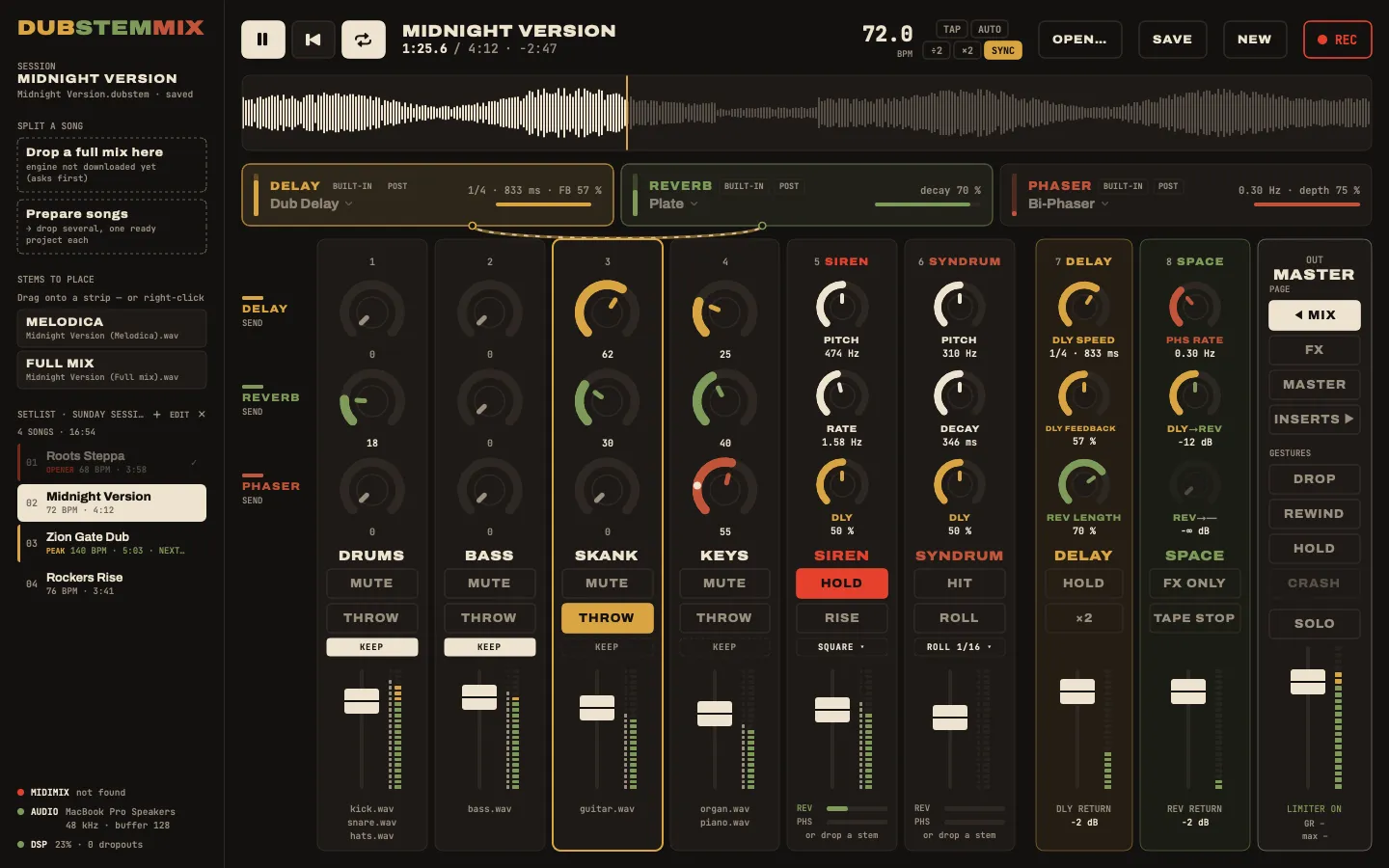
- Strips 1 to 6 hold the stems. Left empty, strip 5 plays a dub siren and strip 6 a Syndrum.
- Strips 7 and 8 hold no stem: they play the effects.
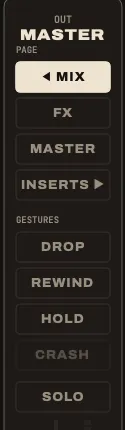
- The right column is the master: the page buttons, the gestures, the master fader.
A stem strip
From top to bottom, on strips 1 to 6:
| Control | On the MIDImix | Does |
|---|---|---|
| Three knobs | the three knobs | depend on the page, see below |
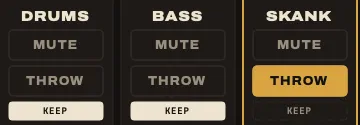
| MUTE | MUTE | cuts the strip; the LED shows it |
| SOLO | hold SOLO, press MUTE (on screen: ⌥-click MUTE) | solos the strip in place: the echo and reverb returns keep playing |
| THROW | hold REC ARM | the dub throw: the strip goes at full level into the delay, while held |
| KEEP | (on screen) | the strip survives the DROP gesture |
| Fader | the fader | volume of the strip, on every page |
Under the fader, the names of the stems on the strip. Next to the meter, a thin grey bar shows what the stems give before the fader and the mute: with the fader down, you still see when the vocal comes in.
Effects never cut
The delay, the reverb and the phaser sit on shared buses, like the sends of a real board. Cutting a strip or pulling its fader down never kills an echo or a reverb tail already on its way. That is the whole point of dub: you cut the vocal, its echo keeps going.
The throw
Hold THROW (REC ARM on the console): the strip goes at full level into the delay, taken before the fader and the mute. So you can throw a strip that is muted and hear only its echo. The Dub throw goes to menu on the DELAY card sends the throw to the delay, the reverb, or both.
The four pages
The faders never change job. The knobs do: BANK RIGHT moves to the next page, BANK LEFT always comes straight back to MIX. On screen, the page buttons sit in the right column.
| Page | Reach it | The knobs of strips 1 to 6 are |
|---|---|---|
| MIX | BANK LEFT | the sends to the delay, the reverb and bus 3 |
| FX | BANK RIGHT | the settings of the effects |
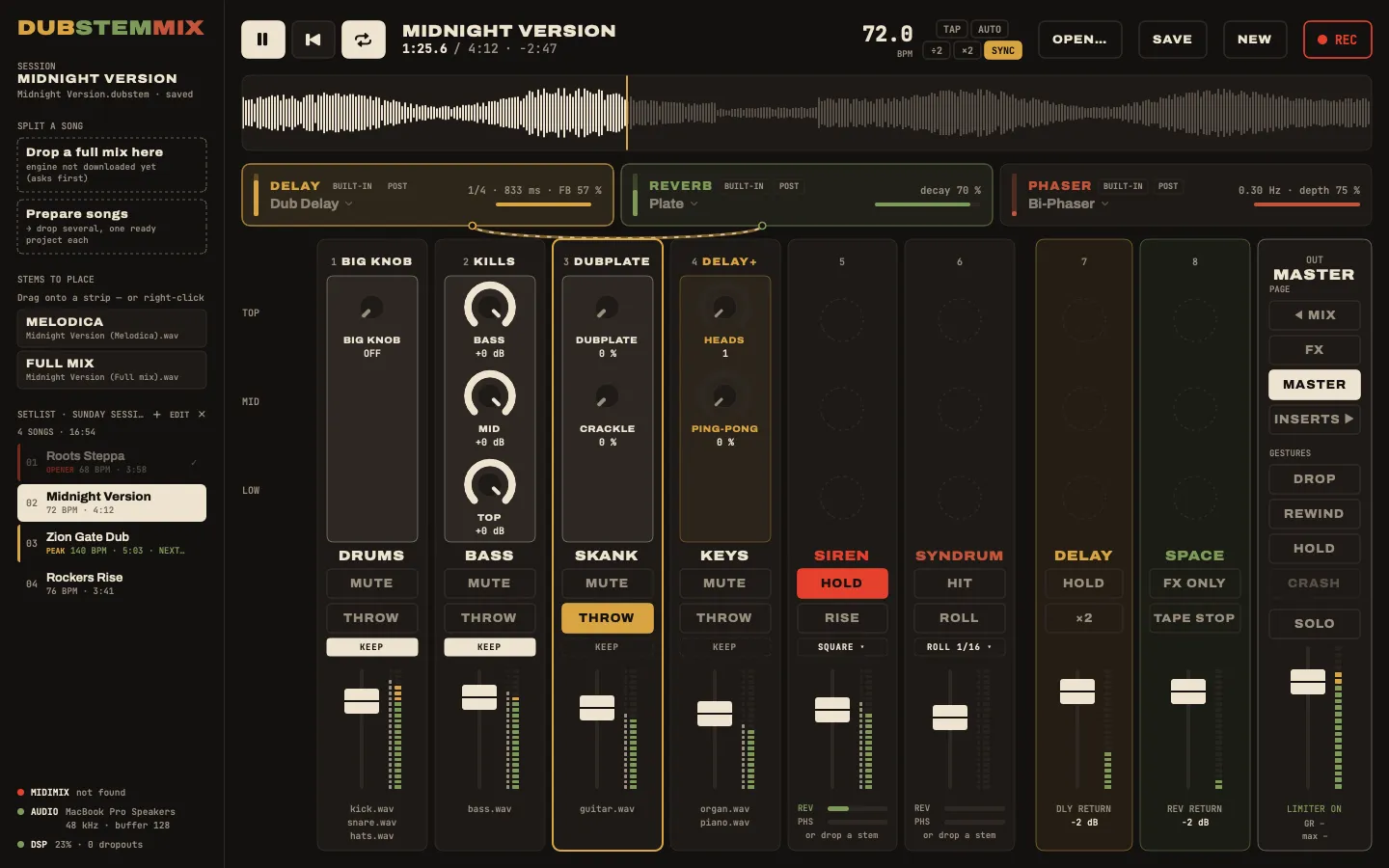
| MASTER | BANK RIGHT again | the master chain: big knob, kills, dubplate, delay heads |
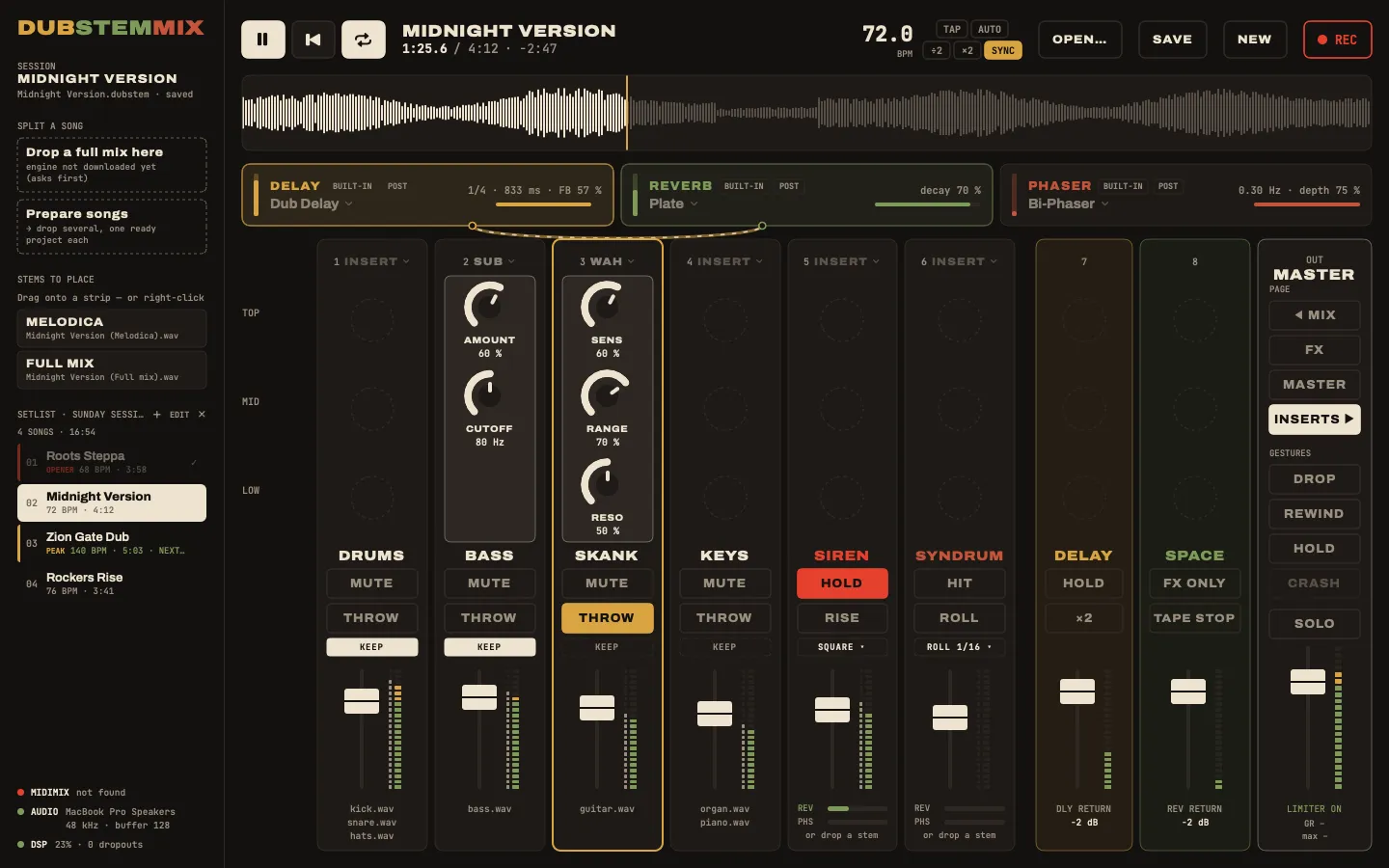
| INSERTS | BANK RIGHT again | each strip’s own effect |
After a page change, each knob waits for you to reach its new value (the dashed ghost mark), then takes over.
MIX: the sends
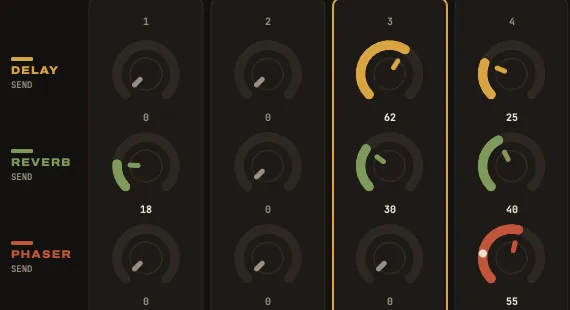
On each stem strip: the top knob sends to the delay, the middle one to the reverb, the bottom one to bus 3 (the phaser, unless you changed it). Sends are taken after the fader by default; Settings can switch any bus to before the fader, for the classic move: fader down, echo still running.
FX: the effects
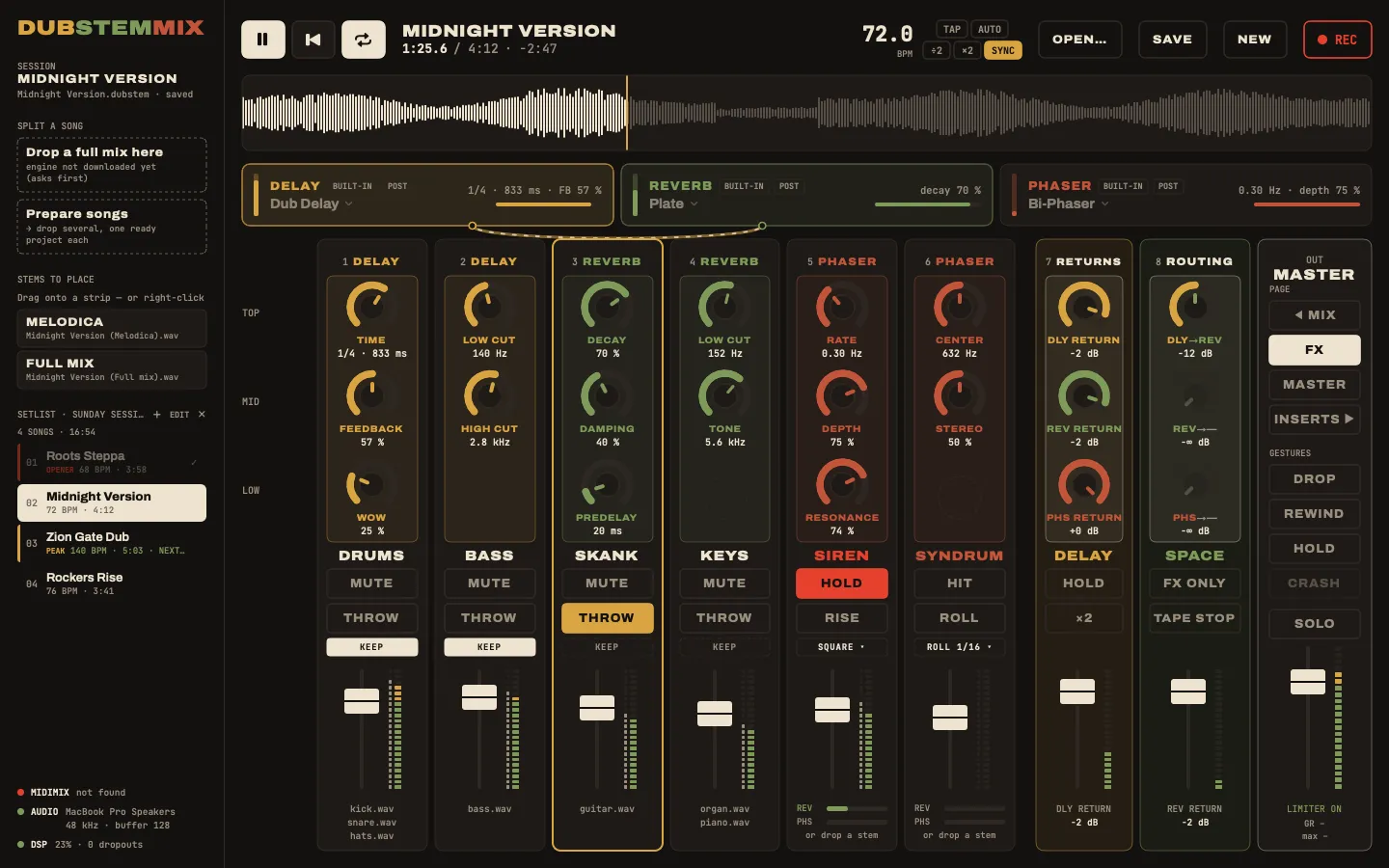
Every knob drives a setting of the built-in effects. The header of each strip says which effect.
| Strip | Top | Middle | Bottom |
|---|---|---|---|
| 1 · delay | time | feedback | wow and flutter |
| 2 · delay | low cut | high cut | |
| 3 · reverb | decay | damping | predelay |
| 4 · reverb | low cut | tone | |
| 5 · phaser | rate | depth | resonance |
| 6 · phaser | center | stereo | |
| 7 · returns | delay return | reverb return | bus 3 return |
| 8 · bus to bus | delay → | reverb → | bus 3 → |
The sounds behind these settings are explained in The effects.
MASTER: the master chain
| Strip | Top | Middle | Bottom |
|---|---|---|---|
| 1 | big knob | ||
| 2 | kill BASS | kill MID | kill TOP |
| 3 | dubplate | crackle | |
| 4 | delay heads | ping-pong |
Strips 5 to 8 have no knob on this page.
INSERTS: one effect per strip
Each of strips 1 to 6 can hold an effect of its own (the siren and the Syndrum too), between its stems and its fader: a sub generator, an auto-wah, or an Audio Unit plugin. Choose it from the Insert menu of the strip. On this page, the three knobs of the strip drive it.
The siren and the Syndrum, strips 5 and 6
A split song fills strips 1 to 4, so 5 and 6 often stay empty. Then they play an instrument: strip 5 a dub siren, strip 6 a Syndrum, the electronic drum of late-seventies dub, the “piou” that falls in pitch.
| Strip 5 · SIREN | Strip 6 · SYNDRUM | |
|---|---|---|
| Top knob | pitch | pitch |
| Middle knob | rate: how fast it goes up and down | decay: how long a hit lasts |
| Bottom knob | send to the delay | send to the delay |
| Fader | volume | volume |
| MUTE | HOLD: the siren sounds while held | HIT: one hit per press |
| REC ARM held | RISE: the siren climbs two octaves, and comes down when you let go | ROLL: hits on the tempo |
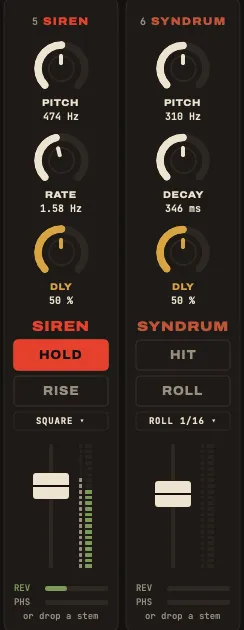
- Both go into the delay from the start (bottom knob at 50 %): the echo keeps the siren turning after you let go.
- With the mouse, on the strip: SQUARE or TRIANGLE for the siren (the square cuts through the mix, the triangle is softer), the roll’s value for the Syndrum (eighths, triplets, sixteenths), and the REV and PHS bars, the sends to the reverb and bus 3. There is no knob left for them on the console. All of it is saved in the project.
- Drop a stem on strip 5 or 6 and it is a stem strip again, with its own sends. Take its last stem off: the instrument comes back.
- DROP leaves the siren and the Syndrum playing: you play them on purpose. PANIC stops them.
The effect strips 7 and 8
They put the effects under your hands without leaving the MIX page: one hand throws the vocal, the other bends the echo.
| Strip 7 · DELAY | Strip 8 · SPACE | |
|---|---|---|
| Top knob | delay speed (ms, or a division with SYNC) | phaser rate |
| Middle knob | delay feedback, up to self-oscillation | delay → its chosen bus |
| Bottom knob | reverb length | reverb → its chosen bus |
| Fader | delay return | reverb return |
| MUTE held | HOLD: the delay loops on itself | FX ONLY: the dry sound leaves, only the effects remain |
| REC ARM held | ×2: the delay goes twice as fast | TAPE STOP: the delay’s tape brakes to a stop |
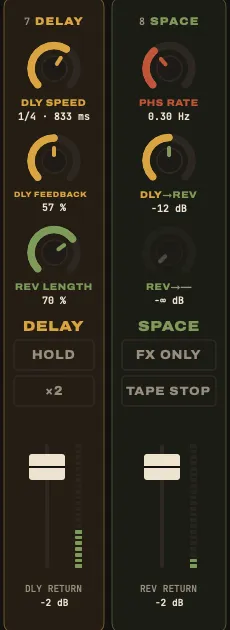
- These knobs reach the same settings as the FX page: turn the delay speed on strip 7 and the time knob of the FX page follows.
- Their faders hold the returns on every page: changing page never changes the sound.
- On the other pages, the knobs of strips 7 and 8 take that page’s role (returns and bus-to-bus sends on FX).
- Hold the buttons on screen, or MUTE / REC ARM on the console. HOLD also has its key, H.
The master column
- PAGE: MIX, FX, MASTER, INSERTS.
- GESTURES: DROP, REWIND, HOLD, CRASH. See Gestures. Under them, SOLO clears the solos.
- The master fader (the big fader on the right of the MIDImix), its meter, and LIMITER ON: the safety limiter. Click it to switch it off; without it, nothing stops the output from clipping above 0 dB, so watch the red top of the meter. Under it, GR shows how many dB the limiter takes off right now, and max the most since you last clicked it; with the limiter off it reads CLIP, how far the output goes over 0 dB.
Every fader up, master included, never clips on its own: at the top of its travel a fader plays the stem at its original level, and the whole tune comes out 6 dB under the original. Only the effects (a runaway echo, a phaser) can push the limiter.
The top of the window

- Play, back to the top, loop: Space, Return, L.
- The title (double-click to rename), the position, the length and the time left.
- The tempo: drag on it to change it, TAP, AUTO, ÷2 and ×2, SYNC to lock the delay to it.
- OPEN…, SAVE, NEW, REC.
- The waveform: it turns orange in the last 30 seconds. Double-click or ⌥-click to jump (a plain click does nothing while playing, so you never jump by mistake).
- The effect cards: DELAY, REVERB and bus 3, with their settings at a glance and their menus. See The effects.