macOS 15 or later · Apple Silicon · Akai MIDImix (optional)
Take the stems.Cut your owndub.
Six stems on six faders, two more to play the effects, the way it was done at King Tubby's: pull the vocal, throw the snare into the echo, drop everything but bass and drums, let the spring crash. No DAW, no session to prepare, nothing to map. Plug the Akai MIDImix, drop a folder of stems, play.
See it played
DubStemMix in action
Install
one line in the Terminal, from the latest release
brew install --cask yoanbernabeu/tap/dubstemmixcurl -fsSL https://raw.githubusercontent.com/yoanbernabeu/DubStemMix/main/install.sh | shBoth install the latest release in /Applications, clear the quarantine flag and keep the in-app updates working.
Or by hand: download DubStemMix-0.14.0.zip from the releases, unzip, move DubStemMix.app to /Applications.
Gatekeeper
The app is signed ad hoc, not notarized: no Apple Developer account behind it, just a selector with a Mac. On first launch macOS may say the app “cannot be opened”. System Settings ▸ Privacy & Security ▸ Open Anyway, once. Homebrew and the install script already clear the flag for you.
The first riddim
- 01
Plug in the MIDImix
On its factory mapping. The status line at the bottom left says “connected”, and warns you if the console sends something the factory mapping does not know.
- 02
Press SEND ALL
The app now knows where every knob and fader sits. After a page change, a knob acts once it reaches the value it now drives, shown as a cream ghost mark until then. No jumps, no surprises mid-tune.
- 03
Drop a folder of stems
Anywhere in the window, then drag each stem onto the strip you want. Nothing is placed for you: you decide what goes where, as you would patch a board.
- 04
Play
Space plays and pauses, Return goes back to the top, L loops the tune. No stems? Drop a full song in SPLIT A SONG, or a whole set in Prepare songs.
- Your first dub, step by step →
Features
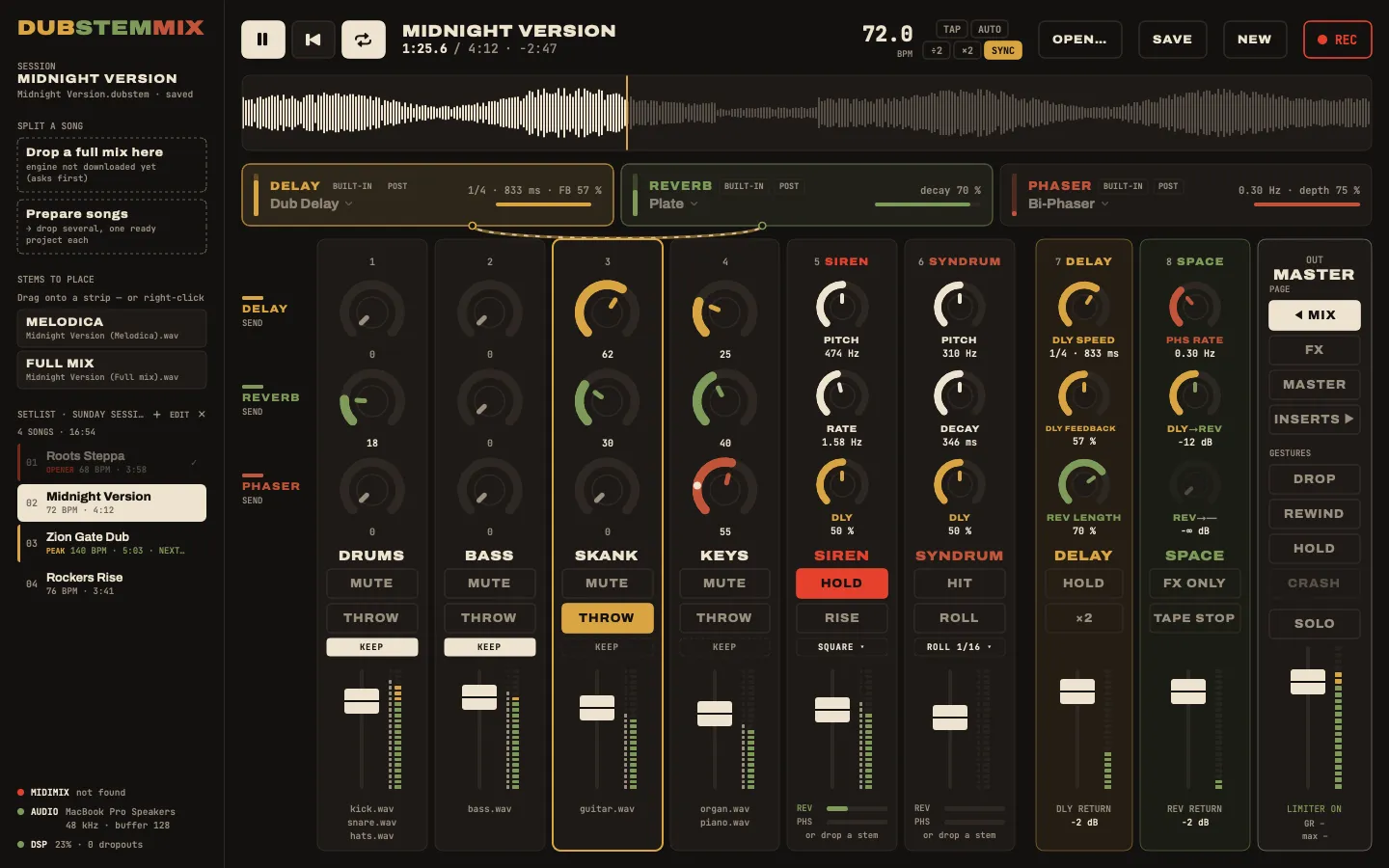
six stem strips, two effect strips, mirrored on screen: what you touch is where you look
Per strip: three knobs, MUTE, REC ARM, a fader. BANK LEFT / BANK RIGHT change what the knobs do; the stem faders stay strip volumes on every page. Four pages: flip through them below.
Reach it: BANK LEFT
The knobs are: sends to DELAY, REVERB, BUS 3
Page 1 / 4
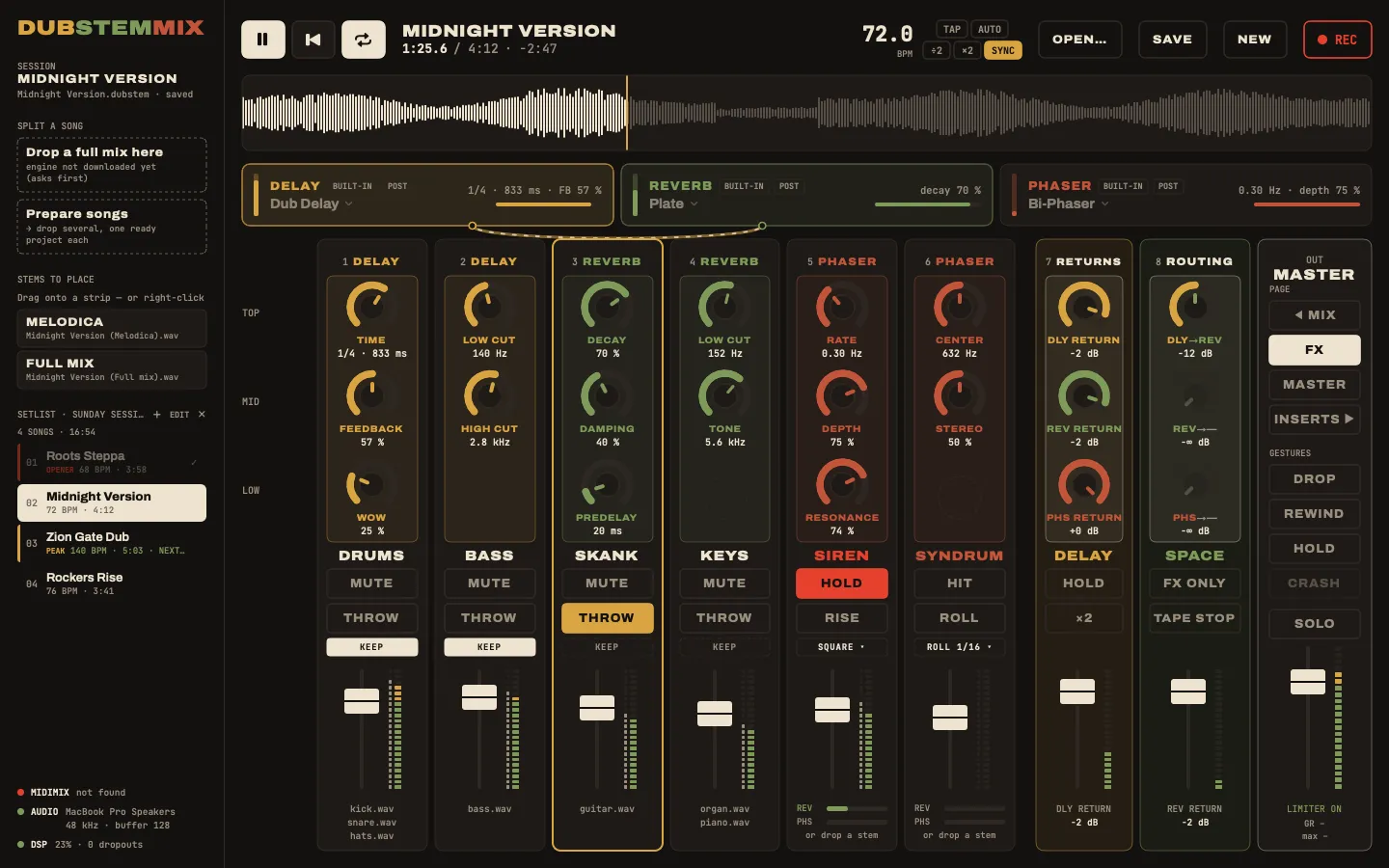
Reach it: BANK RIGHT
The knobs are: delay time, feedback, wow, filters, reverb decay, damping, tone, phaser rate, depth… the three returns and the bus-to-bus sends
Page 2 / 4
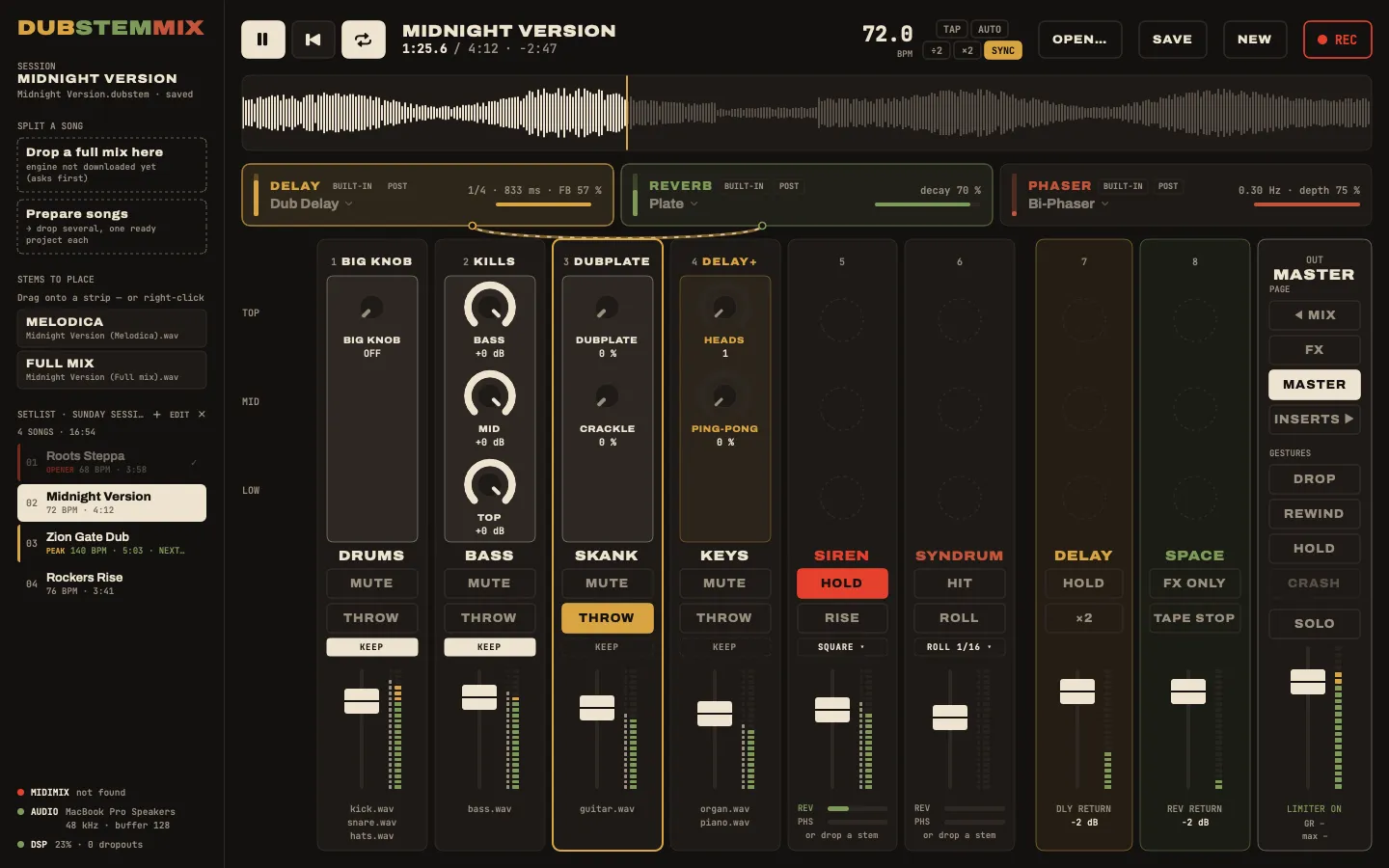
Reach it: BANK RIGHT again
The knobs are: the big knob, the kills, the dubplate colour, delay heads and ping-pong
Page 3 / 4
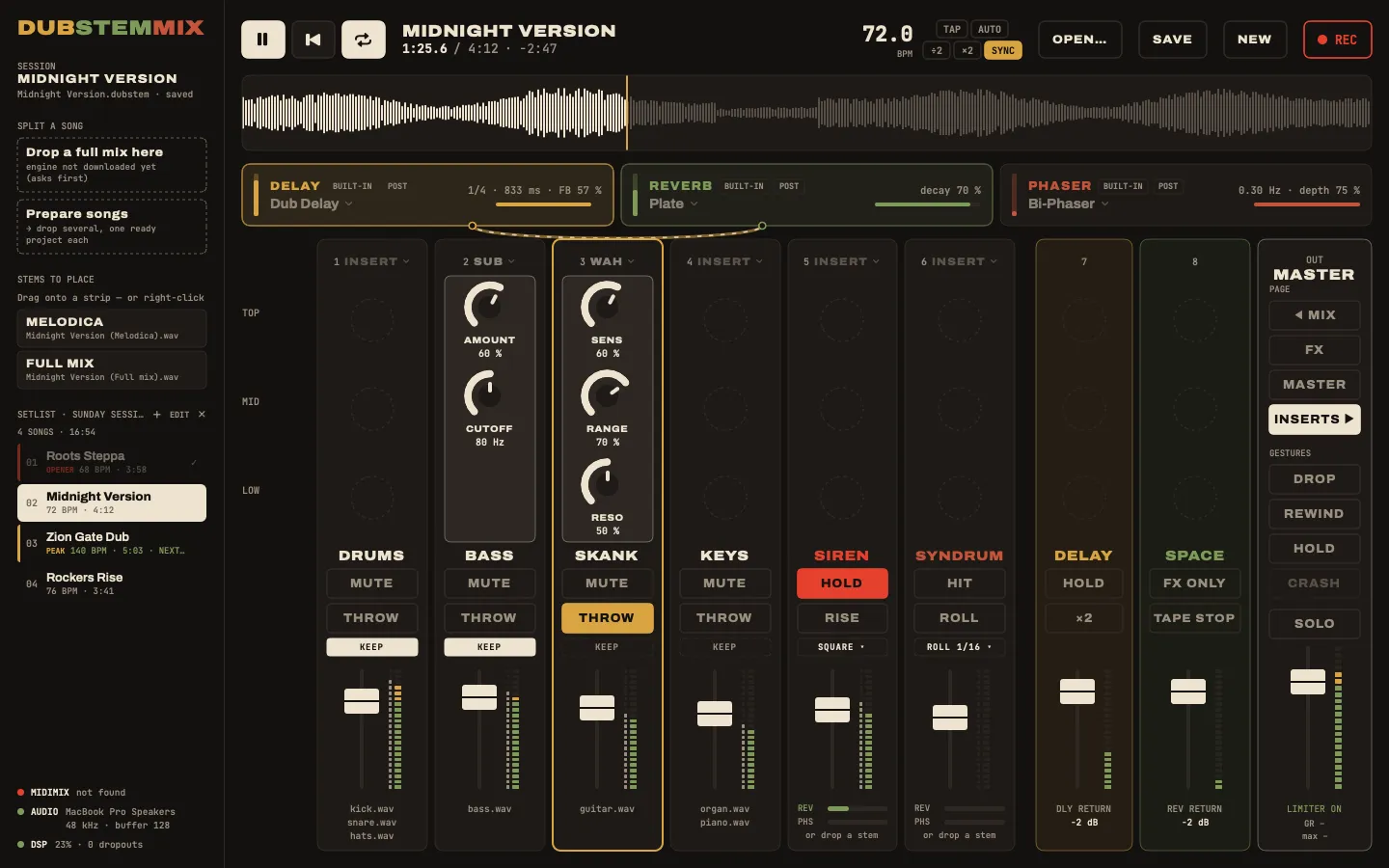
Reach it: BANK RIGHT again
The knobs are: each strip's insert: sub, auto-wah, or a plugin's macros
Page 4 / 4
The board
Six stem strips, a siren and a Syndrum when 5 and 6 are empty, two effect strips, four knob pages. MUTE, solo in place, and the dub throw on REC ARM.
Read the docs →Gestures
Drop to the riddim, hold the echo, crash the spring, pull up the tune, panic. One key or one button each.
Read the docs →The sound
Tape echo, plate and spring reverb, Bi-Phase phaser, King Tubby's big knob, kills, dubplate. All built in, buses you can patch.
Read the docs →Split a song
No stems? Drop a full song: drums, bass, instruments and vocals on strips 1 to 4. Or prepare a whole set at once.
Read the docs →Build a set
Projects, setlists with a colour and a tag per tune, export to another Mac, each session recorded with its tracklist and exported to MP3.
Read the docs →Play live
Arm the next tune while one plays, drop it on Space or pull up into it. Requests mid-set, nothing that cuts by mistake.
Read the docs →
FAQ
Do I need the Akai MIDImix?
No. Everything works with the mouse and the keyboard: knobs, faders, MUTE (⌥-click for solo), THROW, pages, gestures. The console adds the hands.
Other controllers?
Only the MIDImix today. The mix logic never sees it directly: the MIDImix is a profile, plain data. A controller with the same shape (8 strips with 3 knobs, a fader and buttons, two bank buttons, a master fader), like the Novation Launch Control XL, needs only a profile. Pull requests welcome.
Windows, Linux, Intel Macs?
macOS on Apple Silicon only. The interface and the audio engine are built on Apple frameworks (SwiftUI, Core Audio, Audio Units), so a Windows or Linux version would mean rewriting a large part of the app. Intel Macs are untested; building from source may work.
Does splitting a song send my music anywhere?
No. The separation (Demucs, htdemucs_ft) runs on your Mac, inside the app, with no Python to install. Only the model is downloaded, once, after asking you.
Can I use my VST plugins?
DubStemMix loads Audio Unit plugins, the Mac format most plugin makers ship alongside VST: on a bus in place of a built-in effect, or as a strip insert. Chain effects by patching the buses into each other.
Why does macOS complain at first launch?
The app is signed ad hoc, not notarized: no Apple Developer account. Open Anyway once, or use the install script, which clears the quarantine flag.
Which stems can I load?
Any audio files (WAV, AIFF, FLAC, MP3, M4A, CAF), any sample rate, any length; several stems can share a strip. Stems exported from a DAW, bought as multitracks, or split by the app itself. To play out (gigs, releases, streams), use stems you have the rights to.
How does it compare with a DAW or DJ software?
Ableton Live, Logic Pro, Serato, rekordbox, Traktor, djay, VirtualDJ and Mixxx are great at producing or DJing. DubStemMix does one thing: a live dub mix of one tune's stems, ready on the MIDImix, for free. Each comparison is on the Compare page.
Is it free?
Yes, free and open source under the MIT license. Bugs and ideas go in the GitHub issues.
More answers, and fixes for common problems, in Settings and help. How it compares with Ableton Live, Serato, Amp FreQQ and others: Compare.