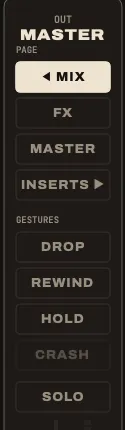
Held gestures last as long as your finger; CRASH, REWIND and PANIC are a single press. Release, and the mix is exactly as it was: gestures never touch your mutes or your faders.
Each one works from the keyboard, from the GESTURES buttons of the right column, or from the console.
Drop: only the riddim
D held, or DROP.
Everything is cut except the strips marked KEEP, and the siren and the Syndrum (you play those on purpose). Mark the drums and the bass (click KEEP under each), hold D: you are on the riddim. Release: the whole tune comes back at once.
The KEEP marks are saved in the project.
Play it on the bar. Drop on the first beat, come back four or eight bars later, on the first beat again.
Throw: one word into the echo
REC ARM held on the strip, or the strip’s THROW button held.
The strip goes at full level into the delay, taken before its fader and its mute. Mute the vocal, throw one word, release: only its echo is left. Works on a snare hit, a horn stab, a guitar chop.
The Dub throw goes to menu on the DELAY card sends the throw to the delay, the reverb, or both.
Hold: the echo loops on itself
H held, HOLD, or MUTE held on strip 7.
The delay closes its input and feeds itself back at full. What was in the echo keeps turning, nothing new comes in. Cut everything else (drop, or pull the faders): the loop plays alone. Release: the delay returns to its feedback.
Crash: hit the spring
C, or CRASH.
A blow on the spring reverb: King Tubby’s thunder, Lee Perry’s crash. It needs the Spring reverb: on the REVERB card, open the menu under its name and choose Spring. On Plate, CRASH is greyed out and says so.
Send a little of the drums into the reverb first, so the spring also rings with the riddim.
Pull-up: rewind the tune
R, or REWIND.
The selector’s rewind: the tape brakes on the whole sound (the echoes slow down with it, and stop with it), the tune goes back to the top and plays again, clean: no echo left over from before the brake.
Between two tunes of a setlist, R pulls up into the next one: see Playing live.
Panic: empty the effects
Esc, or BANK LEFT + BANK RIGHT together on the console.
The delay, the reverb and bus 3 are emptied at once, echoes, tails, HOLD and TAPE STOP included, and the siren and the Syndrum’s roll stop. The tune keeps playing, dry. For the echo that howls too long.
On the effect strips
Strips 7 and 8 have their own held gestures: hold the button on screen, or MUTE / REC ARM on the console.
| Held | Gesture |
|---|---|
| HOLD · MUTE of strip 7 | HOLD, as above |
| ×2 · REC ARM of strip 7 | ×2: the delay goes twice as fast, the echoes jump an octave up, then come back |
| FX ONLY · MUTE of strip 8 | FX ONLY: the dry sound leaves, the stems keep feeding the effects: you hear the tune only through its echoes and reverb |
| TAPE STOP · REC ARM of strip 8 | TAPE STOP: the delay’s tape brakes to a standstill, the echoes collapse; release and it speeds up again |
×2 and TAPE STOP play the built-in delay, not a plugin placed on the delay bus.
Siren and Syndrum
When strips 5 and 6 hold no stem, their buttons play an instrument: hold the button on screen, or MUTE / REC ARM on the console. See the siren and the Syndrum.
| Gesture | |
|---|---|
| HOLD · MUTE of strip 5 held | the siren sounds |
| RISE · REC ARM of strip 5 held | the siren climbs two octaves, and comes back down when you let go |
| HIT · MUTE of strip 6 | one Syndrum hit per press |
| ROLL · REC ARM of strip 6 held | the Syndrum rolls on the tempo |
The classic move. Send the siren into the delay, blow it for a bar, let go: the echo keeps it wailing over the riddim.
Other keys
| Key | Does |
|---|---|
| Space | play, pause |
| Return | back to the top |
| L | loop the tune |
| T | tap the tempo |
| N / P | next / previous tune of the setlist |
| ⌘ R | record the master |
| ⇧ ⌘ R | recorded sessions: tracklists, MP3 export |
| ⌘ S | save the project |
| ⌘ , | settings |